
Submitting VAT returns
The VAT return period is determined by what the user selected when applying for a VAT registration number with Iceland Revenue and Customs (Skatturinn).
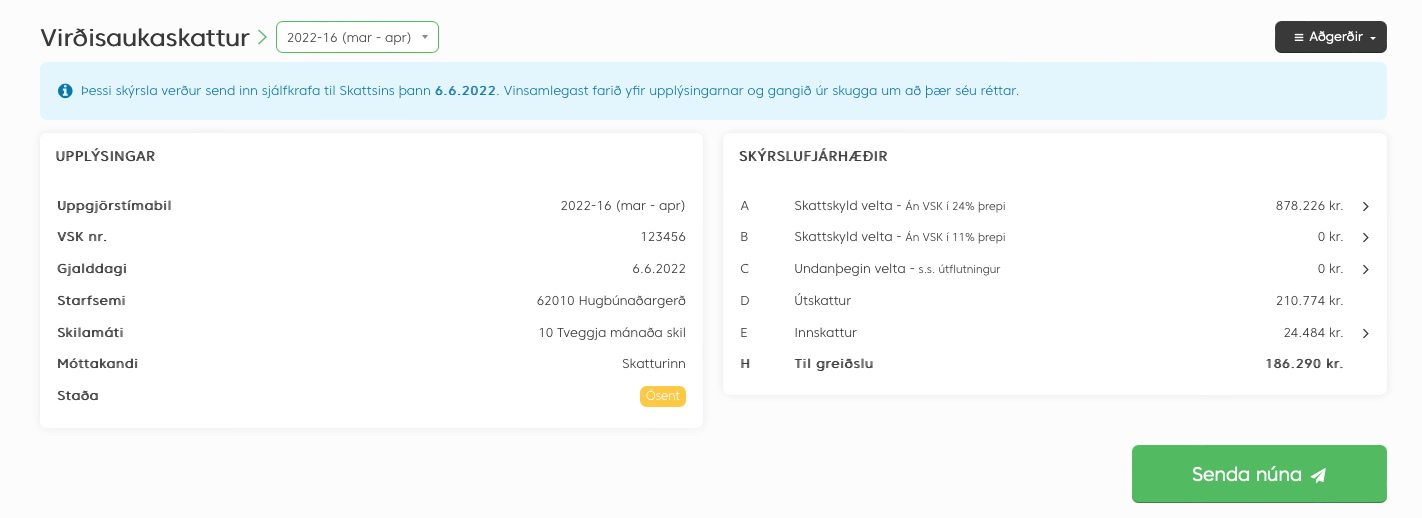
Under Overview > VAT, you can find VAT returns. This displays a list of the VAT returns that have been submitted, with the option to view the current period.
You can select the VAT return period you want to view. What appears in this overview is a list of the invoices and amounts that fall into the current VAT period. A list of input tax is also displayed, which includes the invoices and expenses that should offset and reduce the VAT payment.
If you choose to have Payday automatically submit VAT returns under Settings > Company > VAT, the system will submit the return on the due date, which is the 5th of the month in which it is due.
You can send the VAT return earlier by clicking "Send now".
Further information on VAT returns can be found on the Iceland Revenue and Customs website:
https://www.rsk.is/atvinnurekstur/rafraen-skil/virdisaukaskattur/