
Common actions in reconciliation
Book transfers between own accounts#
The system attempts to pair transfers between own accounts automatically, but sometimes this may fail. If more than one transfer has the same amount on the same day, they must be paired manually. See here: Transfer between own accounts
Book payment to a credit card#
- Click on Other to the right of the bank transaction.
- Click on + to create a new entry.
- Select General Ledger in the Type column and Credit Card (420X) in the "Account" column.
- Click select and then pair them together.
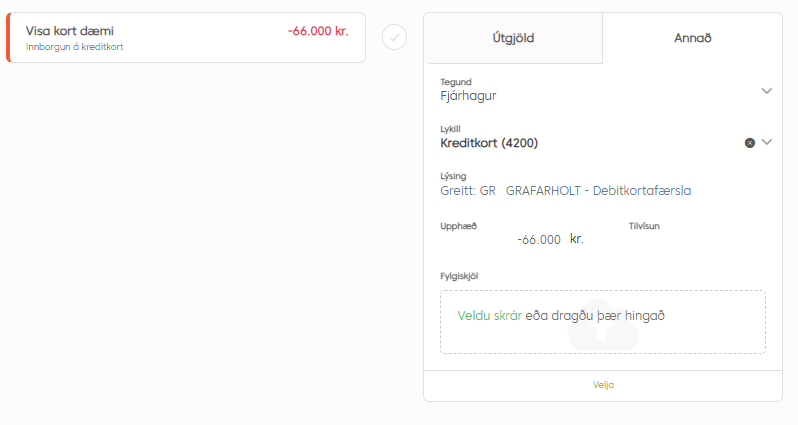 Detailed instructions here: Book payment to a credit card
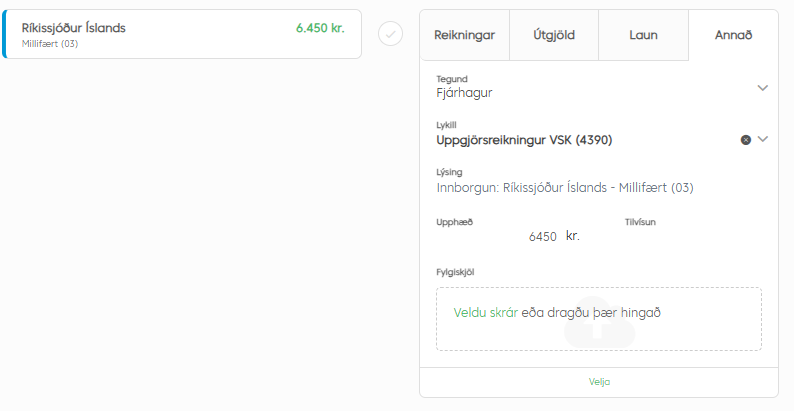
Payment of VAT settlement#
When a VAT settlement is paid, the system suggests a pairing in the reconciliation. You only need to confirm the suggestion by clicking the green checkmark in the middle.
However, in cases where it does not pair automatically, it is best to create the entry manually.
1. Click on Other > Plus
2. Select account 4390
3. Click select and then pair the transaction
Payments of salaries and payroll taxes #
When salaries and payroll taxes are paid, the system suggests a pairing. You only need to confirm the suggestion by clicking the green checkmark in the middle.

If this fails, it is best to follow these instructions on how to pair payments of payroll taxes. See here: Book payments of payroll taxes